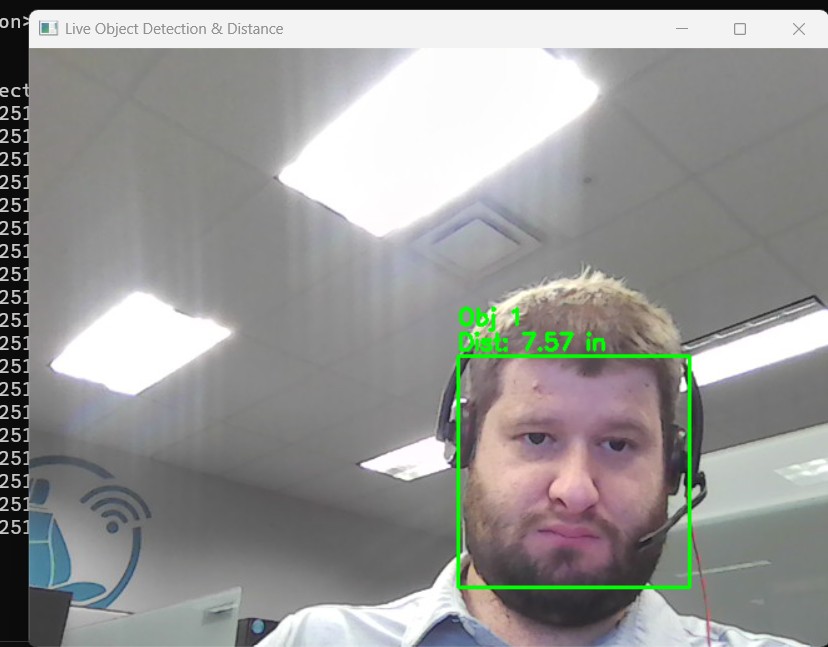
Camera Object Detection
A computer vision prototype that captures live camera frames and applies object detection in real time using OpenCV-based processing. The app demonstrates detection confidence overlays, frame-by-frame tracking, and responsive visualization for rapid prototyping.
Project Details
A computer vision prototype that captures live camera frames and applies object detection in real time using OpenCV-based processing. The app demonstrates detection confidence overlays, frame-by-frame tracking, and responsive visualization for rapid prototyping.
Key Features
- •Real-time camera frame processing
- •Detection overlays with confidence output
- •Python and Flutter integration
- •Responsive design
Project Information
Technology Stack
How to Use Camera Object Detection
Follow this interactive guide to learn all the features and how to use this application effectively.
Setup Requirements
Python-based real-time object detection application.
Instructions
- Install Python 3.7+ and required dependencies
- Install OpenCV: pip install opencv-python
- Ensure you have a working webcam
- Download the object detection model files
Pro Tips
- Check requirements.txt for all dependencies
- Camera permissions may be required
Step 1 of 3
Continue Exploring
Related Projects
Automotive CAN-Bus Logger
Desktop CAN/CAN-FD logging and diagnostics tool with live frame trace and export support for Vector workflows.
Embedded Video Systems Engineer
Interactive embedded video systems dashboard — live H.265/AV1 pipeline, VPU metrics, codec tuning, and multi-platform mobile targets
ADAS Camera Software Test Dashboard
Real-time software test dashboard for an ADAS surround-view camera ECU — 5 cameras, 12 USS sensors, automated test case execution with live pass/fail results.