Embedded Video Systems Engineer
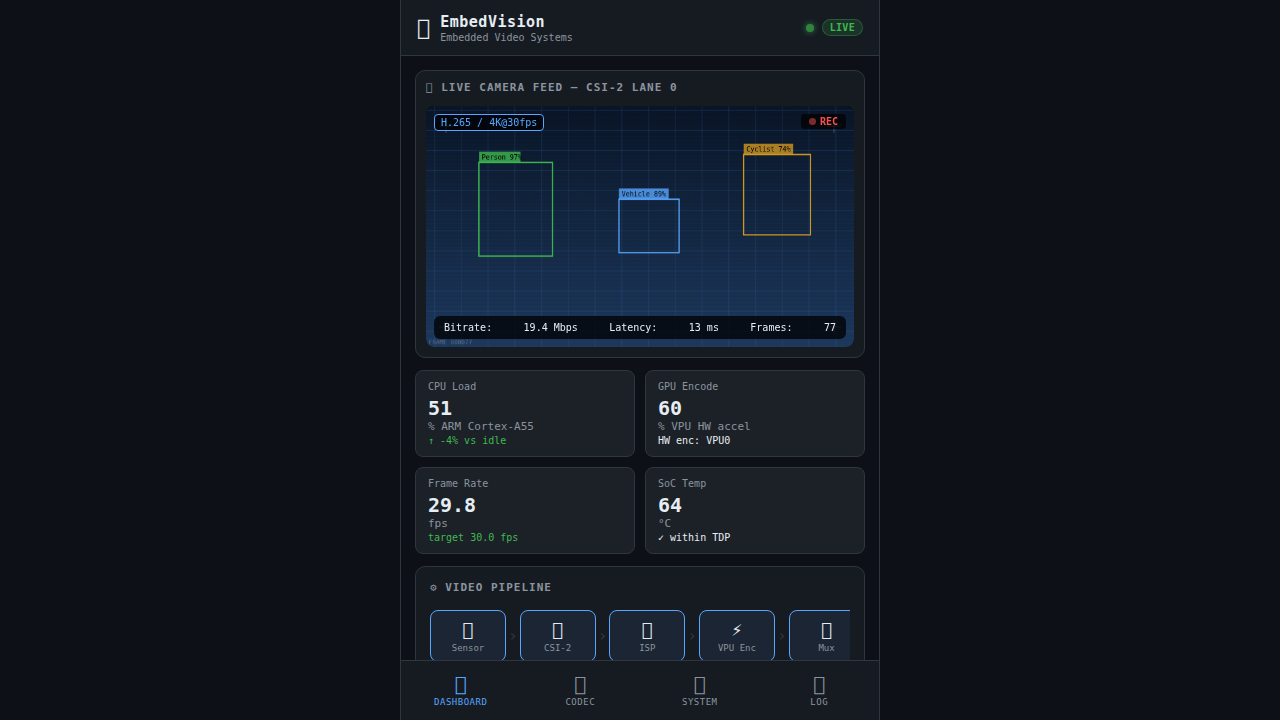
EmbedVision is a full-stack demo built for an Embedded Systems Engineer (Video focus) role. It simulates a production-grade video pipeline running on an NXP i.MX8M Plus SoC: dual MIPI CSI-2 camera ingestion, ISP image processing, hardware-accelerated H.265/H.264/AV1 encoding via VPU, RTSP streaming over GigE, and real-time NPU object detection (YOLOv8). The interactive dashboard showcases ARM Cortex, FreeRTOS/Yocto Linux, GStreamer v4l2 driver stacks, codec parameter tuning, system diagnostics, and cross-platform mobile targets (iOS Swift, Android Kotlin, Flutter, React Native) — all directly aligned with the skills required by the job description.
Download the App
Interactive Demo
Run the interactive demo directly in this page, or open it in a dedicated tab for full-screen testing.
Demo Size
This interactive demo allows you to try Embedded Video Systems Engineer. Use keyboard navigation to interact with the embedded content.
Project Information
Technology Stack
How to Use Embedded Video Systems Engineer
Follow this interactive guide to learn all the features and how to use this application effectively.
Codec Configuration
Configure video encoding parameters for H.265/H.264/AV1.
Instructions
- Select codec type from dropdown (H.265, H.264, AV1, MJPEG)
- Adjust bitrate slider for quality vs file size
- Set GOP size for keyframe intervals
- Tune QP (Quantization Parameter) for compression
Pro Tips
- H.265 provides best compression efficiency
- Lower QP = higher quality but larger files
Step 1 of 3
Related Projects
Automotive CAN-Bus Logger
Desktop CAN/CAN-FD logging and diagnostics tool with live frame trace and export support for Vector workflows.
Camera Object Detection
Real-time camera object detection demo powered by OpenCV pipelines and confidence scoring.
ADAS Camera Software Test Dashboard
Real-time software test dashboard for an ADAS surround-view camera ECU — 5 cameras, 12 USS sensors, automated test case execution with live pass/fail results.