AUTOSAR ECU Software Component Studio
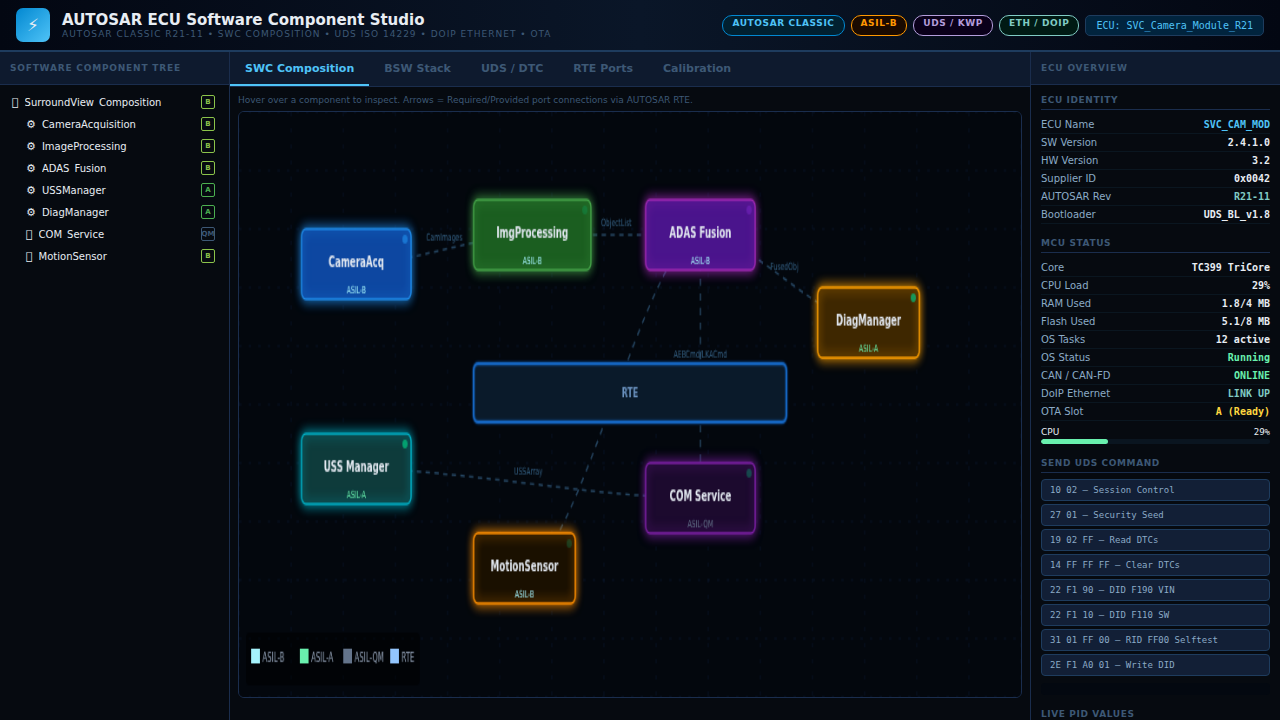
A professional AUTOSAR ECU software component development and diagnostics studio targeting a SurroundView Camera ECU. The tool visualizes the full AUTOSAR Classic architecture: an animated SWC composition canvas showing 7 software components connected via RTE, a layered BSW stack from MCAL to Application, a UDS ISO 14229 diagnostic session with DTC freeze-frame viewer, an RTE port inspector showing all provided/required interfaces with live values, and an A2L-style calibration parameter editor with range sliders and NvM write control.
Interactive Demo
Run the interactive demo directly in this page, or open it in a dedicated tab for full-screen testing.
Demo Size
This interactive demo allows you to try AUTOSAR ECU Software Component Studio. Use keyboard navigation to interact with the embedded content.
Project Information
Technology Stack
How to Use AUTOSAR ECU Software Component Studio
Follow this interactive guide to learn all the features and how to use this application effectively.
SWC Composition Diagram
View animated AUTOSAR software component architecture.
Instructions
- Interactive canvas shows 7 SWCs
- Components: CameraAcq, ImgProcessing, ADAS_Fusion, USSManager, etc.
- Bezier RTE port arrows show connections
- Animated data flow between components
Pro Tips
- RTE (Runtime Environment) connects all SWCs
- Ports show sender-receiver and client-server interfaces
Step 1 of 3
Continue Exploring
Related Projects
Automotive CAN-Bus Logger
Desktop CAN/CAN-FD logging and diagnostics tool with live frame trace and export support for Vector workflows.
Camera Object Detection
Real-time camera object detection demo powered by OpenCV pipelines and confidence scoring.
Embedded Video Systems Engineer
Interactive embedded video systems dashboard — live H.265/AV1 pipeline, VPU metrics, codec tuning, and multi-platform mobile targets